
When diving into software development, you’ll inevitably encounter two terms that often confuse beginners: Git and GitHub. While these tools work together seamlessly, they serve distinctly different purposes in the development ecosystem. Understanding the difference between Git vs GitHub is crucial for any developer looking to master version control and collaborative coding.
What is Git? Understanding Distributed Version Control
Git is a distributed version control system created by Linus Torvalds in 2005. At its core, Git is a command-line tool that tracks changes in your source code during software development. Think of Git as a sophisticated filing system that remembers every change you make to your files.
Key Features of Git:
- Distributed Architecture: Every developer has a complete copy of the project history
- Branching and Merging: Create parallel development paths and combine them seamlessly
- Local Operations: Most operations work offline, making it incredibly fast
- Data Integrity: Uses cryptographic hashing to ensure code integrity
- Free and Open Source: Available to everyone at no cost
How Git Works
Git operates on three main areas:
- Working Directory: Where you modify files
- Staging Area: Where you prepare changes for commit
- Repository: Where Git stores your project’s complete history
When you use Git, you’re essentially creating snapshots of your project at different points in time, allowing you to revert changes, compare versions, and collaborate with other developers effectively.
What is GitHub? The Social Platform for Git
GitHub is a cloud-based hosting service for Git repositories, launched in 2008. While Git handles version control locally, GitHub provides a centralized platform where developers can store, share, and collaborate on their Git repositories online.
Key Features of GitHub:
- Repository Hosting: Store your Git repositories in the cloud
- Collaboration Tools: Pull requests, code reviews, and issue tracking
- Social Features: Follow developers, star repositories, and contribute to open source
- Project Management: Kanban boards, milestones, and project planning tools
- CI/CD Integration: GitHub Actions for automated workflows
- Security Features: Vulnerability scanning and dependency management
GitHub’s Role in Modern Development
GitHub has transformed how developers collaborate on projects. It’s become the de facto platform for open source development, hosting millions of repositories from individual projects to enterprise-level applications.
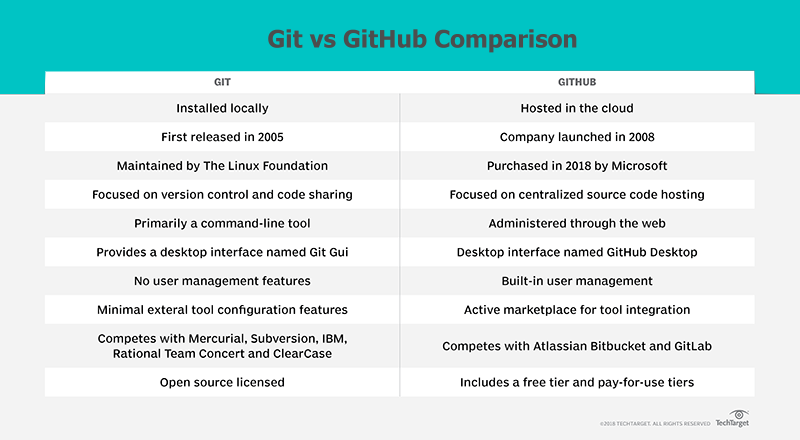
Git vs GitHub: Key Differences Explained
Understanding the fundamental differences between Git and GitHub is essential for effective development workflow:
1. Nature and Purpose
- Git: A version control system (software tool)
- GitHub: A hosting service and collaboration platform (web service)
2. Installation and Access
- Git: Installed locally on your computer
- GitHub: Accessed through web browsers or desktop applications
3. Functionality
- Git: Tracks changes, manages versions, handles branching/merging
- GitHub: Provides remote storage, collaboration features, project management
4. Cost Structure
- Git: Completely free and open source
- GitHub: Free tier available, paid plans for advanced features
5. Internet Dependency
- Git: Works entirely offline
- GitHub: Requires internet connection for most features
When to Use Git vs GitHub
Use Git When:
- Working on personal projects locally
- Need version control without internet connectivity
- Learning fundamental version control concepts
- Working with any Git hosting service (GitLab, Bitbucket, etc.)
Use GitHub When:
- Collaborating with team members
- Contributing to open source projects
- Need project management tools
- Want to showcase your coding portfolio
- Require automated workflows and CI/CD
Getting Started: Git and GitHub Workflow
Setting Up Git
- Download and install Git from the official website
- Configure your username and email
- Initialize a repository with
git init - Start tracking changes with
git addandgit commit
Connecting to GitHub
- Create a GitHub account
- Generate SSH keys for secure authentication
- Create a remote repository on GitHub
- Link your local Git repository to GitHub using
git remote add origin - Push your code with
git push
Alternatives to GitHub
While GitHub dominates the market, several alternatives offer similar Git hosting services:
- GitLab: Offers robust CI/CD features and self-hosting options
- Bitbucket: Integrates well with Atlassian tools like Jira
- SourceForge: One of the oldest code hosting platforms
- Codeberg: Non-profit alternative focused on free software
Best Practices for Git and GitHub
Git Best Practices:
- Write clear, descriptive commit messages
- Use branching strategies like Git Flow
- Commit frequently with logical chunks of work
- Keep repositories clean with
.gitignorefiles
GitHub Best Practices:
- Write comprehensive README files
- Use pull requests for code reviews
- Implement branch protection rules
- Leverage GitHub Actions for automation
- Document your projects thoroughly
The Future of Version Control
As development practices evolve, both Git and GitHub continue adapting. GitHub’s acquisition by Microsoft has led to enhanced integration with development tools, while Git remains the backbone of modern version control systems.
Emerging trends include:
- AI-powered code suggestions and reviews
- Enhanced security features and vulnerability scanning
- Better integration with cloud development environments
- Improved collaboration tools for remote teams
Conclusion: Git vs GitHub – Better Together
The Git vs GitHub debate isn’t about choosing one over the other—it’s about understanding how they complement each other. Git provides the fundamental version control capabilities every developer needs, while GitHub offers the platform and tools necessary for modern collaborative development.
Whether you’re a beginner learning your first programming language or an experienced developer working on complex projects, mastering both Git and GitHub is essential for success in today’s development landscape. Start with Git to understand version control fundamentals, then leverage GitHub’s powerful features to collaborate, share, and showcase your work.
Remember: Git is the engine, and GitHub is the highway that connects developers worldwide. Together, they form the foundation of modern software development, enabling millions of developers to build, share, and improve code collaboratively.
By understanding these tools’ distinct roles and capabilities, you’ll be better equipped to choose the right approach for your projects and contribute effectively to the global development community.