
You have built a beautiful website. You are spending thousands—maybe even lakhs—of rupees on Facebook ads, Google campaigns, and SEO. People are clicking your links. Your analytics dashboard shows hundreds of people visiting your digital storefront every single day.
But at the end of the day, your sales dashboard is empty. Your phone isn’t ringing with new leads.
Having a website not converting visitors into paying customers is one of the most frustrating problems a business owner can face. It feels like throwing money into a fire. If you are wondering, “Why is my website getting traffic but no sales?”—you are not alone. It is an incredibly common problem, but the good news is that the fixes are usually straightforward once you know where to look.
This guide will break down exactly why Indian consumers abandon websites and give you a step-by-step, easy-to-understand checklist to turn your silent website into a revenue-generating machine.
1. The Reality Check: Is Your Website Actually Broken?
Before you panic, we need to talk about what a “normal” website conversion rate actually is in 2026.
Many business owners assume that if 100 people visit their site, at least 10 or 20 should buy something. In reality, the global average e-commerce conversion rate sits between 1.5% and 3.0%.
That means if 100 people visit your online store, and 2 of them buy something, your website is actually performing normally. If your conversion rate is sitting at 0% or 0.5%, however, you have a leak in your system that needs immediate fixing.
Conversion rates also depend heavily on what you are selling. Here is a quick look at standard industry benchmarks:
| Industry / Niche | Average Conversion Rate | Why It Converts At This Rate |
| Food & Beverage | 4.5% – 6.0% | Low prices and high repeat purchases keep this rate very high. |
| Beauty & Cosmetics | 3.0% – 4.5% | Strong visual appeal and brand trust lead to frequent buying. |
| Fashion & Apparel | 1.5% – 3.0% | Doubts about clothing sizes and fit naturally lower the average. |
| B2B Services & Software | 1.5% – 2.5% | These require a longer decision time and multiple approvals. |
| High-Ticket Furniture | 1.0% – 1.5% | Expensive items require heavy research before pulling the trigger. |
If your numbers are far below these averages, it is time to diagnose the problem.
2. Understanding How Your Visitors Buy
To fix a website not converting visitors, you have to understand the journey a customer takes. No one lands on a website for the first time and instantly types in their credit card number. They go through a psychological journey called the AIDA Funnel.
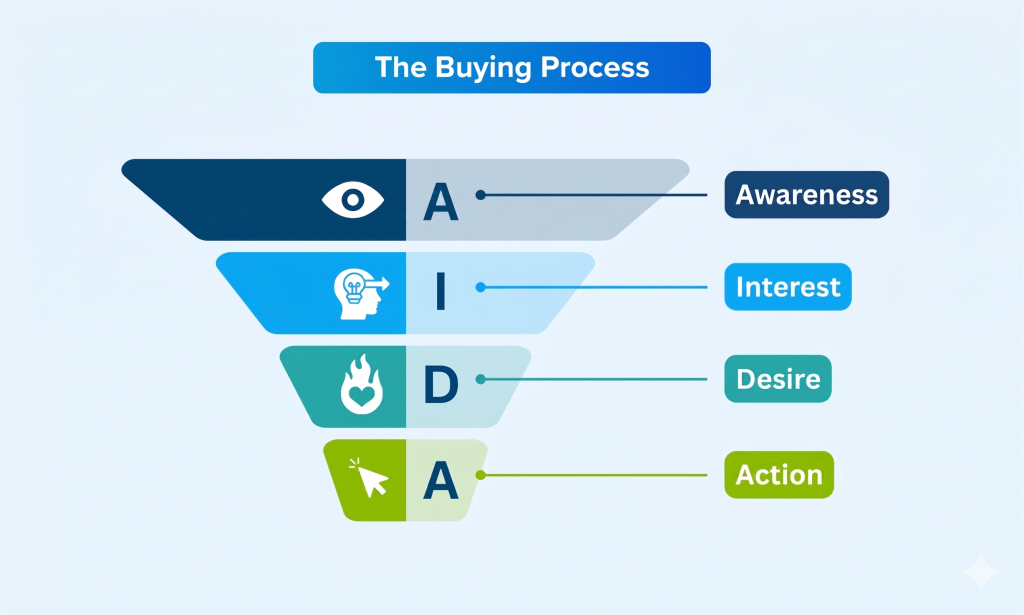
- Awareness: They realize they have a problem and find your website via an ad or search.
- Interest: They read your homepage to see if you can actually solve their problem.
- Desire: They look at your products, read reviews, and decide they want what you have.
- Action: They add to cart, fill out the form, and pay.
If your website fails at any of these steps, the visitor bounces. Let’s look at the top reasons why they leave.
3. Top 6 Reasons Your Website Is Not Converting Visitors
When Indian consumers leave a website without buying, the root cause usually falls into one of these six categories.
Reason 1: Your Website is Slower Than a Local Train
Indian internet users are incredibly impatient. Studies show that if a mobile website takes longer than 3 seconds to load, over 50% of users will abandon it before seeing a single product. A one-second delay can cost you up to 7% of your conversions.
- The Fix: Compress your heavy images before uploading them. Remove unnecessary plugins or animations that slow down the page. Use tools like Google PageSpeed Insights to see exactly what is dragging your speed down.
Reason 2: You Are Missing Crucial Indian “Trust Signals”
The Indian market is highly sensitive to online scams. If a visitor does not feel 100% secure, they will not give you their hard-earned money. If your website looks like it was built in a day, lacks contact information, or only accepts credit cards, trust drops to zero.
- The Fix: Offer familiar payment options like UPI (Google Pay, PhonePe, Paytm) alongside card payments. For physical products, offering Cash on Delivery (COD) is still a massive conversion booster in India. Display a real physical office address, a clear refund policy, and a WhatsApp chat widget so they know real humans run the business.
Reason 3: The “What Do You Even Do?” Problem
You have exactly three seconds to explain what your business does when someone lands on your homepage. If your headline uses complicated jargon like “Synergistic cloud-based solutions for modern paradigms,” your visitor will leave.
- The Fix: Be clear, not clever. Your main headline (the Hero section) should clearly state what you do, who it is for, and how it helps them. For example: “Affordable Web Design for Indian Small Businesses” is infinitely better than “Elevating Digital Experiences.”
Reason 4: Friction at the Checkout Line
Imagine walking into a physical store, picking up a ₹500 t-shirt, and the cashier demands your grandfather’s middle name, your exact date of birth, and makes you fill out a two-page form before taking your cash. You would walk out. Websites do this all the time.
- The Fix: Never force visitors to create an account to buy something. Always offer a “Guest Checkout” option. Only ask for the absolute minimum information required to deliver the product or service.
Reason 5: Your Mobile Experience is Clunky
India is a mobile-first country. Over 70% of your website traffic is likely coming from smartphones. If your website looks great on a laptop but requires pinching and zooming on a mobile phone, you are losing the vast majority of your audience.
- The Fix: Check your website on your own phone. Are the “Buy Now” buttons big enough to tap with a thumb? Do annoying pop-ups block the entire screen, making it impossible to close them? Design for the mobile screen first, laptop second.
Reason 6: Weak or Hidden Calls-to-Action (CTAs)
A Call-to-Action is the button you want people to click. If your buttons just say “Submit” or “Click Here,” they do not inspire anyone to take action. Furthermore, if your buttons blend into the background color of your website, visitors won’t even know where to click.
- The Fix: Make your buttons stand out with a contrasting color (like a bright orange button on a white background). Use action-oriented words that tell the user exactly what they get, such as “Get Your Free Quote,” “Claim Your 20% Discount,” or “Book a Consultation.”
4. See the Math: How Small Tweaks Multiply Revenue
Conversion Rate Optimization (CRO) isn’t about making massive, expensive changes. It’s about fixing tiny leaks. Use the interactive simulator below to see how improving your funnel by just a few percentage points directly increases your final revenue, without spending a single extra rupee on ads.
Conversion Funnel Simulator
Funnel Metrics
Revenue Dashboard
Key Insight: Notice how dropping your bounce rate and increasing your checkout completion by just 5% can drastically increase your Monthly Revenue. You don’t always need more traffic; you just need to convert the traffic you already have.
5. Your Step-by-Step Diagnostic Action Plan
If your website is not converting visitors today, do not try to change everything at once. Follow this logical sequence to identify and plug the leaks in your sales funnel.
1.Test Your Loading Speed:The Foundation.
Go to Google PageSpeed Insights and type in your website URL. Look specifically at your “Mobile” score. If it is in the red, send the report to your web developer immediately. Fix large images and slow servers before doing anything else.
2.Do the ‘3-Second’ Headline Test:The Entry Point.
Show your website’s homepage to a friend who doesn’t know your business well. Take their phone away after exactly 3 seconds. Ask them, “What do I sell, and who do I sell it to?” If they can’t answer, rewrite your main headline to be incredibly literal and clear.
3.Add Social Proof and Trust Signals:Building Confidence.
Ensure you have at least 3 genuine customer testimonials visible on your homepage. Add logos of companies you have worked with, security badges (like SSL and Razorpay/Stripe secure checkout), and prominently display a WhatsApp support button in the bottom corner.
4.Audit Your Own Checkout Process:Finding Friction.
Act like a customer on your own website using your mobile phone. Try to buy your own product. Count how many fields you have to fill out. Count how many clicks it takes. If you find yourself getting annoyed by the process, your actual customers have already left. Enable guest checkout immediately.
5.Track the Drop-Off Point:Data Validation.
Set up Google Analytics 4 (GA4) or a heat-mapping tool like Clarity or Hotjar. Watch the recordings of how people scroll. Find out exactly where they are leaving. If 80% of people leave on the pricing page, you know your pricing format (or the price itself) is the problem.
Stop Paying for Traffic That Bounces
Driving traffic to a website not converting visitors is like pouring water into a bucket with holes in the bottom. Spending more money on ads will not solve the problem—it will only waste water faster.
Take a step back, put yourself in the shoes of a skeptical Indian consumer, and look at your website objectively. By speeding up your load times, clarifying your message, integrating local payment methods like UPI, and removing friction from the checkout, you will plug the leaks. Once the bucket is sealed, every rupee you spend on marketing will finally start turning into profit.
Frequently Asked Questions (FAQ)
Why is my website getting traffic but no sales?
If you are getting traffic but no sales, your marketing is working, but your website is failing to build trust or create desire. Common culprits include slow loading speeds, confusing headlines, forced account creation at checkout, or missing Indian payment options like UPI and Cash on Delivery.
What is a “good” conversion rate for an Indian e-commerce website?
While it varies by industry, a standard global e-commerce conversion rate is between 1.5% and 3.0%. However, in India, where shoppers are highly price-sensitive and heavily research-driven, sitting between 1.0% and 2.0% is a healthy baseline for most standard retail stores.
How can I make my Indian customers trust my website more?
Indian consumers are cautious about online fraud. To build instant trust, prominently display a WhatsApp chat button, clear return and refund policies, a physical office address, and familiar payment gateways like Razorpay or PhonePe. Showing genuine customer reviews with photos also heavily boosts credibility.
Will changing my button colors actually increase sales?
Yes, but not because of the color itself—it is about contrast. If your website is mostly blue and your “Buy Now” button is also blue, it becomes invisible. Changing it to a bright contrasting color like orange or green draws the eye and makes the next step obvious, which directly improves conversions.





The point about getting traffic but no conversions is something a lot of businesses overlook because they assume more visitors automatically means more sales. In my experience, even small issues like slow mobile pages, unclear calls to action, or a lack of trust signals can cause visitors to leave without taking the next step. A conversion checklist like this is often more valuable than simply increasing ad spend.
I pay a quick visit every day a few sites and sites to read articles or reviews, except this blog provides
quality based content.
The point about traffic not automatically translatingWebsite Conversion Tips into sales is something many businesses overlook. In my experience, even small issues like unclear calls-to-action, slow page loads, or a lack of trust signals can cause visitors to leave before converting. Looking forward to seeing how your checklist helps businesses identify and fix those conversion bottlenecks.
A lot of businesses focus on increasing traffic and overlook the friction points that stop visitors from taking action. Beyond conversion rates, it would be interesting to look at trust signals, page speed, and mobile usability together, since many Indian users make quick decisions about whether to stay or leave a site.
The point about not panicking over traffic without immediate sales is important, especially since manyWebsite Conversion Strategies business owners assume more visitors automatically means more conversions. I’d also add that regularly reviewing user behavior—such as where visitors drop off in the checkout or inquiry process—can reveal issues that analytics traffic numbers alone won’t show. This kind of data-driven approach often makes a bigger difference than simply increasing ad spend.
A lot of businesses focus on increasing traffic, but the real issue is often the gap between visitor intent and what the landing page delivers. For Indian audiences, even small improvements like faster mobile load times, clearer trust signals, and a stronger call-to-action can make a noticeable difference in conversion rates.
A lot of businesses focus on driving more traffic when the real issue is what happens after visitors arrive. I’m glad this article highlights that a website can look great and still fail to convert if it doesn’t build trust or remove friction from the user journey. It would also be interesting to see how conversion benchmarks differ between mobile and desktop users in India.
Hi there! This post couldn’t be written any better!
Reading this post reminds me of my good old room mate!
He always kept chatting about this. I will forward this write-up to him.
Pretty sure he will have a good read. Many thanks for sharing!
The point about getting traffic but still seeing no leads is something many businesses overlook—visitors arriving on the site doesn’t automatically mean they’re finding enough trust signals or a clear next step. It would also be interesting to see how factors like mobile page speed and checkout or inquiry form friction impact conversion rates, especially for Indian users who are often browsing on smartphones.
Howdy! I could have sworn I’ve been to this web site before
but after browsing through some of the posts I realized it’s new to me.
Anyhow, I’m definitely happy I discovered it and I’ll
be book-marking it and checking back frequently!
Why users still use to read news papers when in this technological globe everything is presented
on net?
优质xxx平台 提供高质量的成人娱乐内容。选择
有保障的平台 以获得安全且愉快的观看体验。
my web site 群交色情影片
流媒体成人内容 在安全可靠的平台上进行。寻找 有保障的视频来源 以获得一流体验。
Свежие xxx-платформы предлагают инновационный контент для развлечений для
взрослых. Откройте для себя безопасные новые платформы для современного опыта.
Feel free to visit my blog post :: купить виагру
Inhoud voor volwassenen kunnen worden gestreamd op betrouwbare platforms voor
privacy. Ontdek veilige websites voor kwaliteitsweergave.
Look into my website :: buy xanax online
I want to to thank you for this wonderful read!!
I definitely loved every bit of it. I have you
saved as a favorite to look at new things you post…
Hi there! I know this is kinda off topic but I’d figured I’d ask.
Would you be interested in exchanging links or maybe guest writing a
blog article or vice-versa? My blog discusses a lot of the
same subjects as yours and I believe we could greatly benefit from each
other. If you might be interested feel free to send me an email.
I look forward to hearing from you! Wonderful blog by the way!
My brother recommended I might like this blog.
He was totally right. This post truly made my day.
You can not imagine simply how much time I had spent for this information! Thanks!
bedava bitcoin, ücretsiz kripto, casino bonus, casino sitesi, güvenilir casino,
online casino, canlı casino, slot oyunları, rulet oyna,
poker oyna, blackjack oyna, bahis sitesi, güvenilir bahis, canlı bahis,
spor bahisleri, yüksek oran bahis, kaçak bahis, bedava bahis, deneme bonusu, hoşgeldin bonusu, casino free spin,
slot free spin, kumar sitesi, kumarhane, çevrimiçi kumar, illegal
bahis, yasa dışı bahis, illegal casino, yasadışı kumar, kayıt olmadan bahis, kimlik doğrulama
yok bahis, bahis para yatır, bahis para çek, casino para
çekme, casino para yatırma, slot jackpot, jackpot casino, bedava casino, ücretsiz casino, casino demo, canlı krupiye,
canlı rulet, canlı blackjack, canlı poker, canlı baccarat, baccarat oyna, baccarat sitesi,
çevrimsiz bonus, yatırımsız bonus, çevrim şartsız bonus, kayıp bonusu, kayıp iadesi, free bet, freespin, casino cashback, bahis cashback, bedava iddaa,
maç izle bahis, canlı maç bahis, futbol bahis, basketbol bahis, tenis
bahis, esports bahis, sanal bahis, sanal spor bahis,
köpek yarışı bahis, at yarışı bahis, greyhound
bahis, poker freeroll, escort bayan, escort istanbul, escort ankara, escort izmir,
escort bursa, escort adana, escort kocaeli, escort mersin, escort antalya, escort gaziantep, escort konya, escort
diyarbakır, escort aydın, escort kayseri, vip escort, ucuz escort,
eve gelen escort, otele gelen escort, saatlik escort, gecelik
escort, haftalık escort, çıkmalık escort,
rezidans escort, öğrenci escort, yabancı escort, rus escort,
ukraynalı escort, arap escort, sarışın escort, esmer escort, olgun escort
Can you tell us more about this? I’d love to
find out some additional information.
Everything is very open with a very clear description of the challenges.
It was truly informative. Your website is
extremely helpful. Thank you for sharing!
Hey there just wanted to give you a quick heads up.
The words in your post seem to be running off the screen in Firefox.
I’m not sure if this is a formatting issue or something to do with browser compatibility but I thought I’d post to let you know.
The style and design look great though! Hope you get the problem resolved
soon. Many thanks
Immerse into the sizzling world of lesbian GAY PORN SEX VIDEOS
sex videos, where your deepest fantasies come alive! Explore a thrilling collection of ultra-clear content,
featuring captivating performers in intense scenes that consume your desires.
From teasing encounters to wild moments, each video is tailored to indulge your fantasies
with diverse expressions of pleasure. Join for instant access, with smooth streaming
and discreet privacy to fuel your experience whenever.
Why compromise for less when you can indulge in the irresistible transexual porn sex videos?
Our vast library offers premium content, showcasing enthralling stars in taboo scenarios that
keep your arousal racing. With an sleek platform and
frequent updates, you’ll always find scorching new videos to enjoy.
No subscriptions—just endless pleasure at your fingertips.
Click now and let these wild videos transform your moments!
I every time used to study article in news papers but now as I
am a user of internet thus from now I am using net
for articles, thanks to web.
Nice blog here! Also your site loads up very fast! What
web host are you using? Can I get your affiliate link to your host?
I wish my web site loaded up as fast as yours lol
thank you for sharing with us, I think this website truly stands out : D.
Wow that was odd. I just wrote an extremely long comment but after I clicked submit my comment didn’t show up.
Grrrr… well I’m not writing all that over again. Anyhow, just wanted to say great blog!
bedava bitcoin, ücretsiz kripto, casino bonus, casino
sitesi, güvenilir casino, online casino, canlı casino, slot oyunları, rulet oyna,
poker oyna, blackjack oyna, bahis sitesi, güvenilir bahis, canlı bahis, spor bahisleri,
yüksek oran bahis, kaçak bahis, bedava bahis, deneme bonusu,
hoşgeldin bonusu, casino free spin, slot free spin, kumar sitesi, kumarhane, çevrimiçi kumar, illegal bahis, yasa dışı bahis, illegal casino,
yasadışı kumar, kayıt olmadan bahis, kimlik doğrulama yok
bahis, bahis para yatır, bahis para çek, casino para çekme, casino para yatırma, slot
jackpot, jackpot casino, bedava casino, ücretsiz casino,
casino demo, canlı krupiye, canlı rulet, canlı blackjack, canlı poker, canlı baccarat,
baccarat oyna, baccarat sitesi, çevrimsiz bonus, yatırımsız bonus,
çevrim şartsız bonus, kayıp bonusu, kayıp iadesi, free bet,
freespin, casino cashback, bahis cashback, bedava iddaa,
maç izle bahis, canlı maç bahis, futbol bahis, basketbol bahis,
tenis bahis, esports bahis, sanal bahis, sanal spor bahis, köpek yarışı bahis, at yarışı bahis,
greyhound bahis, poker freeroll, escort bayan, escort
istanbul, escort ankara, escort izmir, escort bursa, escort adana, escort
kocaeli, escort mersin, escort antalya, escort gaziantep, escort konya, escort diyarbakır, escort aydın, escort kayseri, vip escort, ucuz escort,
eve gelen escort, otele gelen escort, saatlik escort, gecelik escort, haftalık
escort, çıkmalık escort, rezidans escort, öğrenci escort, yabancı escort, rus escort,
ukraynalı escort, arap escort, sarışın escort, esmer escort, olgun escort
I’ll right away seize your rss feed as I can’t to find
your email subscription link or e-newsletter service.
Do you have any? Kindly let me know so that I could subscribe.
Thanks.
bedava bitcoin, ücretsiz kripto, casino bonus,
casino sitesi, güvenilir casino, online casino, canlı casino,
slot oyunları, rulet oyna, poker oyna, blackjack oyna,
bahis sitesi, güvenilir bahis, canlı bahis, spor bahisleri, yüksek oran bahis, kaçak bahis,
bedava bahis, deneme bonusu, hoşgeldin bonusu, casino free
spin, slot free spin, kumar sitesi, kumarhane,
çevrimiçi kumar, illegal bahis, yasa dışı bahis, illegal casino, yasadışı kumar, kayıt olmadan bahis,
kimlik doğrulama yok bahis, bahis para yatır, bahis para çek, casino para çekme,
casino para yatırma, slot jackpot, jackpot casino,
bedava casino, ücretsiz casino, casino demo, canlı krupiye,
canlı rulet, canlı blackjack, canlı poker,
canlı baccarat, baccarat oyna, baccarat sitesi, çevrimsiz bonus,
yatırımsız bonus, çevrim şartsız bonus, kayıp bonusu, kayıp iadesi, free bet, freespin, casino cashback, bahis cashback, bedava iddaa, maç izle bahis,
canlı maç bahis, futbol bahis, basketbol bahis, tenis bahis, esports bahis, sanal bahis, sanal spor bahis, köpek yarışı bahis, at yarışı bahis, greyhound bahis, poker freeroll,
escort bayan, escort istanbul, escort ankara, escort izmir, escort bursa, escort
adana, escort kocaeli, escort mersin, escort antalya, escort gaziantep, escort konya, escort diyarbakır, escort aydın, escort kayseri, vip escort, ucuz escort, eve
gelen escort, otele gelen escort, saatlik escort, gecelik
escort, haftalık escort, çıkmalık escort, rezidans escort, öğrenci escort, yabancı escort, rus
escort, ukraynalı escort, arap escort, sarışın escort,
esmer escort, olgun escort
Discover how technology and exchanges simplify selling bitcoin in india.
¡No lo puedo creer, hermano! Soy Ramón desde Luque.
Como apostador empedernido que llora sangre por su selección, llevo días sin dormir bien,
llorando de la alegría.
Al empezar el campeonato, quería romper el televisor de la rabia con ese maldito 4-1 contra USA que me hizo perder mucha plata.
Pero ahí salió a relucir el orgullo de nuestra tierra: le metimos
una garra tremenda para ganarle 1-0 a Turquía y con el alma en un hilo clasificamos
raspando, empatando a cero con los australianos.
¡Pero la verdadera historia se escribió contra Alemania en dieciseisavos!
Nadie daba un solo guaraní por nosotros, pero mostramos unos
huevos gigantes para mantener el 1-1 frente a esa máquina.
¡Esa tanda de penales, ganando 4-3, me hizo
llorar tirado en el piso como una criatura!
¡Me forré de plata apostando al batacazo y rompiendo todos los pronósticos!
Este jueves nos cruzamos con la Francia en octavos de final y ya tengo mi boleto de apuesta armado.
¡Las cuotas dicen que somos boleta, pero mi corazón sabe que ganamos!
¡Rohayhu Albirroja, a matar o morir en la cancha!
Hello there! I could have sworn I’ve been to this blog before
but after checking through some of the post I realized it’s
new to me. Anyways, I’m definitely delighted I found it and I’ll
be book-marking and checking back frequently!
¡Dios mío, sigo temblando de la emoción! Me llamo Derlis desde
Ciudad del Este.
Como buen timbero y paraguayo de pura cepa, mi señora me quiere echar de casa por lo que apuesto, pero
no me importa absolutamente nada.
En el debut de esta Copa del Mundo norteamericana, toqué fondo anímicamente con ese
maldito 4-1 contra USA que me hizo perder mucha plata.
Pero ahí salió a relucir el orgullo de nuestra tierra: vencimos a los turcos 1-0 sudando sangre en la cancha y con el alma en un hilo clasificamos raspando, empatando a cero con los australianos.
¡Lo que vivimos contra los alemanes fue épico, digno de una película!
El mundo entero de los pronósticos nos daba por muertos,
pero empatamos 1-1 dejando el alma y la piel en los 120 minutos.
¡Esa tanda de penales, ganando 4-3, me hizo llorar tirado
en el piso como una criatura!
¡Con lo que gané en esa apuesta a la sorpresa me pago las deudas de todo el año y
festejo un mes seguido!
Ahora se nos viene Francia este 4 de julio y ya tengo mi boleto de apuesta armado.
¡No me importa si la lógica dice que nos golean, yo muero con la mía
y apuesto todo a una nueva hazaña!
¡Vamos Paraguay, carajo!
What a material of un-ambiguity and preserveness of
valuable know-how regarding unexpected feelings.
¡Mba’éichapa los perros! Soy Carlos desde San Lorenzo.
Como alguien que respira fútbol y se juega hasta el sueldo en combinadas, siento que el
corazón me va a reventar de tanta emoción.
Al empezar el campeonato, casi me da un infarto con ese maldito 4-1 contra USA que
me hizo perder mucha plata. Pero ahí salió a relucir el orgullo de
nuestra tierra: le metimos una garra tremenda para ganarle 1-0 a
Turquía y con el alma en un hilo clasificamos raspando,
empatando a cero con los australianos.
¡Lo que vivimos contra los alemanes fue épico, digno de una película!
Todas las cuotas de las casas de apuestas estaban brutalmente en contra, pero aguantamos
como verdaderos leones el 1-1 hasta el final de la prórroga.
¡Y en los penales, mandamos a los alemanes
a llorar a su casa ganando 4-3!
¡Me forré de plata apostando al batacazo y rompiendo todos
los pronósticos!
Se viene el monstruo de Francia en octavos
y me juego mi destino entero por mis muchachos.
¡Que nos den por perdedores, mucho mejor, así paga más mi apuesta!
¡Rohayhu Albirroja, a matar o morir en la cancha!
I appreciate this detailed explanation of the Lowe’s feedback program.
Customer surveys help businesses understand and meet customer expectations.
¡Mba’éichapa los perros! Soy Ramón desde Luque.
Como buen timbero y paraguayo de pura cepa, llevo días sin dormir bien, llorando de la alegría.
Cuando arrancamos este Mundial 2026, toqué fondo anímicamente al perder 4-1 contra Estados Unidos, una vergüenza
terrible. Pero la raza guaraní nunca se rinde: le metimos una garra tremenda para ganarle 1-0 a Turquía y después aguantamos a muerte para sacar ese 0-0 contra Australia.
¡El partido contra Alemania me quitó diez años
de vida y me devolvió la fe! Nadie daba un solo guaraní por nosotros, pero mostramos unos huevos
gigantes para mantener el 1-1 frente a esa máquina.
¡Esa tanda de penales, ganando 4-3, me
hizo llorar tirado en el piso como una criatura!
¡Reventé mi cuenta en la casa de apuestas porque le puse plata a que pasábamos
y pagaban una cuota de locura total!
Se viene el monstruo de Francia en octavos y ya tengo mi boleto de apuesta
armado. ¡Que nos den por perdedores, mucho mejor, así paga más mi apuesta!
¡La garra guaraní no se rinde jamás, nos vemos en la final del mundo!
¡Mba’éichapa los perros! Soy Hugo desde Ciudad del Este.
Como apostador empedernido que llora sangre por su selección, siento que el corazón me
va a reventar de tanta emoción.
En el debut de esta Copa del Mundo norteamericana, sentí que se
me caía el mundo encima cuando los yanquis nos metieron ese humillante 4-1.
Pero ahí salió a relucir el orgullo de nuestra tierra: vencimos a los turcos 1-0 sudando sangre en la cancha y con el alma en un hilo clasificamos raspando, empatando a cero con los australianos.
¡Pero la verdadera historia se escribió contra Alemania en dieciseisavos!
Nadie daba un solo guaraní por nosotros, pero aguantamos como verdaderos leones
el 1-1 hasta el final de la prórroga. ¡Y en los penales, mandamos a los alemanes a llorar a su casa
ganando 4-3!
¡No se imaginan la fortuna que gané!
Se viene el monstruo de Francia en octavos y apuesto el auto,
la casa y la vida a mi querida Albirroja. ¡No me importa si la lógica
dice que nos golean, yo muero con la mía y apuesto todo a una nueva hazaña!
¡Vamos Paraguay, carajo!
¡Mba’éichapa los perros! Me llamo Ramón desde Fernando de la Mora.
Como un enfermo de las apuestas deportivas y fanático a muerte de la Albirroja, mi señora me quiere echar de casa por
lo que apuesto, pero no me importa absolutamente nada.
En el debut de esta Copa del Mundo norteamericana, casi me da un infarto al perder 4-1 contra
Estados Unidos, una vergüenza terrible.
Pero ahí salió a relucir el orgullo de nuestra tierra:
sufrimos como unos condenados para clavarle el 1-0 a Turquía y
logramos sobrevivir a la fase de grupos con ese sufrido 0-0 ante Australia.
¡Lo que vivimos contra los alemanes fue épico, digno de una película!
Todas las cuotas de las casas de apuestas estaban brutalmente en contra, pero aguantamos como verdaderos leones
el 1-1 hasta el final de la prórroga. ¡Esa tanda de penales, ganando 4-3, me hizo llorar tirado en el piso como una criatura!
¡Me forré de plata apostando al batacazo y rompiendo todos los pronósticos!
Se viene el monstruo de Francia en octavos y le voy a meter los ahorros de
toda mi vida a Paraguay sin pensarlo. ¡No me importa si la
lógica dice que nos golean, yo muero con la mía y apuesto todo a
una nueva hazaña!
¡A dejar hasta la última gota de sangre, vamos
mi Paraguay querido!
¡Qué locura total, chamigos! Me llamo Miguel desde Ciudad del Este.
Como buen timbero y paraguayo de pura cepa, les juro que estoy viviendo el mejor
sueño de mi vida.
En el debut de esta Copa del Mundo norteamericana, quería romper el televisor de la rabia al perder 4-1 contra Estados Unidos, una vergüenza terrible.
Pero ahí salió a relucir el orgullo de nuestra tierra: vencimos a los turcos 1-0 sudando sangre en la cancha y con el
alma en un hilo clasificamos raspando, empatando a cero con los australianos.
¡Pero la verdadera historia se escribió contra
Alemania en dieciseisavos! Nadie daba un solo guaraní por nosotros,
pero aguantamos como verdaderos leones el 1-1 hasta el final de la prórroga.
¡Los eliminamos 4-3 desde los doce pasos, un milagro hermoso y sangriento!
¡Reventé mi cuenta en la casa de apuestas porque le puse plata a
que pasábamos y pagaban una cuota de locura total!
Ahora se nos viene Francia este 4 de julio y apuesto el auto,
la casa y la vida a mi querida Albirroja. ¡No me importa si la lógica dice que nos
golean, yo muero con la mía y apuesto todo a una nueva
hazaña!
¡La garra guaraní no se rinde jamás, nos vemos en la final del mundo!
This piece of writing provides clear idea in support of the new users of blogging,
that truly how to do blogging and site-building.
¡Mba’éichapa los perros! Acá les escribe Miguel desde Asunción.
Como un enfermo de las apuestas deportivas
y fanático a muerte de la Albirroja, llevo días sin dormir bien,
llorando de la alegría.
Cuando arrancamos este Mundial 2026, casi me da un infarto cuando los yanquis nos metieron ese humillante 4-1.
Pero ahí salió a relucir el orgullo de nuestra tierra: le metimos una garra tremenda
para ganarle 1-0 a Turquía y después aguantamos a muerte para sacar ese 0-0 contra Australia.
¡Lo que vivimos contra los alemanes fue épico, digno de una película!
Todas las cuotas de las casas de apuestas estaban brutalmente en contra, pero aguantamos como verdaderos leones el 1-1 hasta el final
de la prórroga. ¡Los eliminamos 4-3 desde los doce pasos, un milagro hermoso y sangriento!
¡Con lo que gané en esa apuesta a la sorpresa me pago las deudas de todo el
año y festejo un mes seguido!
Este jueves nos cruzamos con la Francia en octavos
de final y me juego mi destino entero por
mis muchachos. ¡Las cuotas dicen que somos boleta, pero mi corazón sabe
que ganamos!
¡La garra guaraní no se rinde jamás, nos vemos
en la final del mundo!
Hey there would you mind letting me know which web host you’re utilizing?
I’ve loaded your blog in 3 completely different browsers and
I must say this blog loads a lot faster then most.
Can you suggest a good hosting provider at a fair price?
Many thanks, I appreciate it!
Watch adult videos securely on reputable adult platforms.
Find trusted sites for a premium experience.
Have a look at my website :: best anal porn site
¡Mba’éichapa los perros! Soy Javier desde Ciudad del Este.
Como un enfermo de las apuestas deportivas y fanático a muerte de la Albirroja, les
juro que estoy viviendo el mejor sueño de mi vida.
Cuando arrancamos este Mundial 2026, casi me da un infarto al perder 4-1 contra Estados Unidos,
una vergüenza terrible. Pero como manda nuestra historia, resurgimos de las cenizas: vencimos a los turcos 1-0 sudando sangre en la
cancha y logramos sobrevivir a la fase de grupos con ese sufrido 0-0 ante Australia.
¡Lo que vivimos contra los alemanes fue épico, digno de una película!
El mundo entero de los pronósticos nos daba por muertos, pero mostramos unos huevos gigantes para mantener el 1-1 frente a esa máquina.
¡Y en los penales, mandamos a los alemanes
a llorar a su casa ganando 4-3!
¡Reventé mi cuenta en la casa de apuestas porque le puse
plata a que pasábamos y pagaban una cuota de locura total!
Este jueves nos cruzamos con la Francia en octavos de
final y me juego mi destino entero por mis muchachos.
¡Las cuotas dicen que somos boleta, pero mi corazón sabe que ganamos!
¡Rohayhu Albirroja, a matar o morir en la cancha!
This is a very informative post about online casinos and betting platforms.
I especially liked how it explains the importance of choosing a licensed site before signing up.
Many players often ask where they can find reliable gaming platforms with fair odds and smooth payouts.
From what I’ve seen, checking platforms like vn22vip helps users compare
features, bonuses, and overall experience.
Thanks for sharing these insights — they’re helpful for both
beginners and experienced bettors.
Howdy! Do you use Twitter? I’d like to follow you if that would be
okay. I’m definitely enjoying your blog and look forward to new posts.
Hi there, I enjoy reading all of your article.
I like to write a little comment to support you.
Pretty nice post. I simply stumbled upon your weblog and wanted to say that I’ve really enjoyed
browsing your blog posts. In any case I’ll be subscribing to your feed and
I am hoping you write again soon!
Wow, amazing blog layout! How lengthy have you ever been running a blog for?
you made blogging glance easy. The total look of your website is magnificent, let alone the content!
I every time spent my half an hour to read this weblog’s content everyday along with a cup of coffee.
bedava bitcoin, ücretsiz kripto, casino bonus, casino
sitesi, güvenilir casino, online casino, canlı casino, slot oyunları,
rulet oyna, poker oyna, blackjack oyna, bahis sitesi, güvenilir bahis, canlı bahis, spor bahisleri,
yüksek oran bahis, kaçak bahis, bedava bahis, deneme bonusu,
hoşgeldin bonusu, casino free spin, slot free spin, kumar sitesi,
kumarhane, çevrimiçi kumar, illegal bahis, yasa dışı bahis, illegal casino, yasadışı kumar, kayıt olmadan bahis, kimlik
doğrulama yok bahis, bahis para yatır, bahis para çek, casino para çekme, casino
para yatırma, slot jackpot, jackpot casino, bedava casino, ücretsiz casino,
casino demo, canlı krupiye, canlı rulet, canlı blackjack, canlı poker, canlı baccarat,
baccarat oyna, baccarat sitesi, çevrimsiz bonus, yatırımsız bonus,
çevrim şartsız bonus, kayıp bonusu, kayıp iadesi, free bet,
freespin, casino cashback, bahis cashback, bedava iddaa, maç izle bahis,
canlı maç bahis, futbol bahis, basketbol bahis, tenis bahis,
esports bahis, sanal bahis, sanal spor bahis, köpek yarışı bahis, at
yarışı bahis, greyhound bahis, poker freeroll,
escort bayan, escort istanbul, escort ankara, escort izmir, escort bursa, escort adana,
escort kocaeli, escort mersin, escort antalya, escort gaziantep, escort konya, escort diyarbakır, escort aydın, escort kayseri, vip escort, ucuz escort,
eve gelen escort, otele gelen escort, saatlik escort, gecelik escort, haftalık escort,
çıkmalık escort, rezidans escort, öğrenci escort, yabancı escort, rus escort, ukraynalı escort, arap escort, sarışın escort, esmer escort,
olgun escort
Informative article, exactly what I was looking for.
A helpful guide explains efficient strategies for selling bitcoin in india.
whoah this blog is wonderful i really like reading your articles.
Stay up the great work! You realize, a lot of persons are looking
around for this information, you could aid them greatly.
Hey there would you mind stating which blog platform you’re using?
I’m planning to start my own blog soon but I’m having a
difficult time making a decision between BlogEngine/Wordpress/B2evolution and Drupal.
The reason I ask is because your design seems different then most blogs and I’m looking for something unique.
P.S Apologies for getting off-topic but I had to ask!
Appreciate this post. Will try it out.
Visit my web page … Teen NSFW
Hi! Do you know if they make any plugins to safeguard against hackers?
I’m kinda paranoid about losing everything I’ve worked hard on. Any suggestions?
Pretty nice post. I just stumbled upon your blog and wanted to say that Ive truly enjoyed browsing your blog
posts. In any case I will be subscribing to your rss feed and I hope you write again very soon!
I simply couldn’t leave your site before suggesting that I really loved the usual information an individual supply
for your visitors? Is gonna be back often to investigate cross-check new posts
I was reсommendеd this wеb ѕite by my cousin. I
am not sure wһether this post is written by him as no ߋne else know such detailed
about my problem. You are incredible! Ƭhanks!
Hello! This is my first visit to your blog! We are a team of volunteers and starting a new
project in a community in the same niche. Your blog provided us beneficial information to
work on. You have done a marvellous job!
bedava bitcoin, ücretsiz kripto, casino bonus,
casino sitesi, güvenilir casino, online casino, canlı casino, slot oyunları, rulet oyna, poker oyna, blackjack
oyna, bahis sitesi, güvenilir bahis, canlı bahis, spor bahisleri,
yüksek oran bahis, kaçak bahis, bedava bahis, deneme bonusu, hoşgeldin bonusu, casino free spin, slot free
spin, kumar sitesi, kumarhane, çevrimiçi kumar, illegal bahis, yasa dışı bahis, illegal casino, yasadışı kumar, kayıt olmadan bahis, kimlik doğrulama yok bahis, bahis para yatır,
bahis para çek, casino para çekme, casino para yatırma, slot jackpot, jackpot casino, bedava casino,
ücretsiz casino, casino demo, canlı krupiye, canlı rulet, canlı blackjack, canlı
poker, canlı baccarat, baccarat oyna, baccarat sitesi, çevrimsiz bonus,
yatırımsız bonus, çevrim şartsız bonus, kayıp bonusu, kayıp
iadesi, free bet, freespin, casino cashback, bahis cashback,
bedava iddaa, maç izle bahis, canlı maç bahis, futbol bahis, basketbol bahis,
tenis bahis, esports bahis, sanal bahis, sanal spor bahis, köpek yarışı bahis, at yarışı bahis, greyhound bahis,
poker freeroll, escort bayan, escort istanbul, escort ankara, escort izmir, escort bursa, escort adana, escort kocaeli, escort mersin,
escort antalya, escort gaziantep, escort konya,
escort diyarbakır, escort aydın, escort kayseri, vip escort, ucuz escort, eve gelen escort, otele gelen escort, saatlik escort, gecelik escort, haftalık escort, çıkmalık escort,
rezidans escort, öğrenci escort, yabancı
escort, rus escort, ukraynalı escort, arap escort, sarışın escort,
esmer escort, olgun escort
What’s up, all is going nicely here and ofcourse every one is sharing facts, that’s truly good,
keep up writing.
bookmarked!!, I love your website!
Discover reliable exchanges that support selling bitcoin in india.
Thanks for the marvelous posting! I certainly enjoyed reading it, you happen to be a
great author. I will ensure that I bookmark your blog and may come back someday.
I want to encourage you continue your great writing, have a nice holiday weekend!
bedava bitcoin, ücretsiz kripto, casino bonus, casino
sitesi, güvenilir casino, online casino, canlı casino, slot oyunları, rulet oyna,
poker oyna, blackjack oyna, bahis sitesi, güvenilir bahis, canlı bahis, spor bahisleri, yüksek oran bahis, kaçak
bahis, bedava bahis, deneme bonusu, hoşgeldin bonusu, casino free spin, slot free spin, kumar sitesi, kumarhane,
çevrimiçi kumar, illegal bahis, yasa dışı bahis,
illegal casino, yasadışı kumar, kayıt olmadan bahis, kimlik doğrulama yok bahis, bahis para yatır, bahis para çek, casino para çekme, casino para
yatırma, slot jackpot, jackpot casino, bedava casino, ücretsiz casino,
casino demo, canlı krupiye, canlı rulet, canlı blackjack, canlı poker, canlı
baccarat, baccarat oyna, baccarat sitesi, çevrimsiz bonus, yatırımsız bonus, çevrim şartsız bonus, kayıp bonusu,
kayıp iadesi, free bet, freespin, casino cashback, bahis cashback,
bedava iddaa, maç izle bahis, canlı maç bahis, futbol bahis, basketbol bahis, tenis bahis, esports bahis,
sanal bahis, sanal spor bahis, köpek yarışı bahis, at yarışı bahis,
greyhound bahis, poker freeroll, escort bayan, escort istanbul, escort ankara,
escort izmir, escort bursa, escort adana, escort kocaeli, escort mersin,
escort antalya, escort gaziantep, escort konya, escort
diyarbakır, escort aydın, escort kayseri, vip escort, ucuz escort, eve gelen escort, otele gelen escort, saatlik
escort, gecelik escort, haftalık escort, çıkmalık escort,
rezidans escort, öğrenci escort, yabancı escort, rus escort, ukraynalı escort, arap escort, sarışın escort,
esmer escort, olgun escort
If you desire to get much from this post then you
have to apply such strategies to your won webpage.
Keep on writing, great job!
Stop by my blog post – schwimmbadzubehör online bestellen
bedava bitcoin, ücretsiz kripto, casino bonus, casino sitesi,
güvenilir casino, online casino, canlı casino, slot oyunları, rulet oyna,
poker oyna, blackjack oyna, bahis sitesi, güvenilir bahis, canlı bahis, spor bahisleri, yüksek oran bahis, kaçak bahis, bedava bahis,
deneme bonusu, hoşgeldin bonusu, casino free spin, slot free spin, kumar sitesi, kumarhane, çevrimiçi kumar, illegal bahis, yasa
dışı bahis, illegal casino, yasadışı kumar, kayıt olmadan bahis, kimlik doğrulama yok bahis, bahis para yatır,
bahis para çek, casino para çekme, casino para yatırma, slot jackpot,
jackpot casino, bedava casino, ücretsiz casino, casino demo,
canlı krupiye, canlı rulet, canlı blackjack, canlı poker, canlı baccarat, baccarat oyna, baccarat sitesi, çevrimsiz bonus, yatırımsız
bonus, çevrim şartsız bonus, kayıp bonusu, kayıp iadesi, free bet, freespin, casino
cashback, bahis cashback, bedava iddaa, maç izle bahis, canlı maç bahis,
futbol bahis, basketbol bahis, tenis bahis, esports bahis, sanal bahis, sanal spor bahis,
köpek yarışı bahis, at yarışı bahis, greyhound bahis, poker freeroll, escort bayan, escort istanbul, escort ankara, escort izmir, escort
bursa, escort adana, escort kocaeli, escort mersin, escort antalya, escort
gaziantep, escort konya, escort diyarbakır, escort aydın,
escort kayseri, vip escort, ucuz escort, eve gelen escort, otele gelen escort, saatlik escort, gecelik escort, haftalık escort,
çıkmalık escort, rezidans escort, öğrenci escort, yabancı escort, rus escort, ukraynalı escort,
arap escort, sarışın escort, esmer escort,
olgun escort
My brother recommended I would possibly like this website.
He was once entirely right. This put up actually made
my day. You can not imagine simply how so much time I had spent
for this information! Thank you!
my blog … 4K TV
詳しい回答をありがとうございます。正しい脚の長さや各部位の寸法を詳しく公開してくださり感動。繊細な体のラインや皺の造形が非常にリアルに再現。特別なボディメイク対応について詳しく説明があり分かりやすい。細部まで配慮したサービスに今後も大変期待しております
โพสต์นี้ มีประโยชน์มาก ค่ะ
ดิฉัน ไปเจอรายละเอียดของ หัวข้อที่คล้ายกัน
ที่คุณสามารถดูได้ที่ weiwei
168
น่าจะถูกใจใครหลายคน
เพราะให้ข้อมูลเชิงลึก
ขอบคุณที่แชร์ คอนเทนต์ดีๆ นี้
และหวังว่าจะได้เห็นโพสต์แนวนี้อีก
Hello, i believe that i noticed you visited my blog thus i came to go back the
want?.I’m trying to find issues to improve my website!I guess its good enough to use some of your ideas!!
I enjoyed seeing this, i’ve been thinking about this for a while.
Салют всем! Я Лена, я из Алматы.
Последние несколько лет я плотно сижу
на онлайн-играх. Но в последнее время я устала потеть без результата.
Недавно я прочитала на одном
сайте очень подробный обзор про приватный софт.
Там очень круто расписывалось,
как работают приватные скрипты с гибкой настройкой Smooth-наводки, чтобы
даже серверные нейросети ничего не заподозрили.
Автор приводил скриншоты логов, доказывающих, что вероятность детекта сводится к нулю.
Короче, я решила рискнуть и купила
подписку на софт. Чтобы протестить по
полной, я купила мульти-пак подписок сразу на
несколько игр.
Мой выбор пал на комбо для Dota 2, CS 2
и Valorant.
Вы не поверите, но буквально за неделю игры я вышла
в топ лидерборда. Мой скилл визуально взлетел до небес.
Что самое главное – никаких банов, потому что разработчики постоянно обновляют обходы под
патчи. Всем советую попробовать,
это реально меняет правила игры!
Доброго времени суток, народ! Меня зовут Алиса,
живу в Варшавы.
Я уже давно я трачу свободное время на катки.
Однако недавно я постоянно
сливала катки из-за рандомных тимейтов.
Недавно я изучила очень мощный материал про
обход современных античитов.
Меня поразил подробный разбор
того, как работают внешние
ESP радары, которые читают пакеты и вообще не вмешиваются в память самой игры.
В тексте приводилась детальная статистика, доказывающих, что сейчас с
софтом играет огромное количество хай-ранг стримеров.
Короче, я решила рискнуть и купила
подписку на софт. Чтобы протестить по полной, я купила мульти-пак подписок
сразу на несколько игр.
Оформила доступ к софту для Dota
2 и Apex Legends.
Результат просто бомба – буквально
за пару недель я стала разносить любые лобби.
Я просто доминирую в каждой катке.
Что самое главное – никаких
банов, потому что настройки очень тонкие.
Короче, девочки и мальчики, этот софт — мастхэв!
bedava bitcoin, ücretsiz kripto, casino bonus,
casino sitesi, güvenilir casino, online casino, canlı casino,
slot oyunları, rulet oyna, poker oyna, blackjack oyna, bahis
sitesi, güvenilir bahis, canlı bahis, spor bahisleri, yüksek oran bahis, kaçak bahis,
bedava bahis, deneme bonusu, hoşgeldin bonusu, casino free spin, slot free spin, kumar sitesi, kumarhane, çevrimiçi kumar, illegal bahis, yasa dışı bahis, illegal casino, yasadışı kumar, kayıt olmadan bahis, kimlik doğrulama yok bahis,
bahis para yatır, bahis para çek, casino para çekme,
casino para yatırma, slot jackpot, jackpot casino, bedava casino, ücretsiz casino, casino demo, canlı krupiye, canlı rulet, canlı blackjack, canlı poker,
canlı baccarat, baccarat oyna, baccarat sitesi, çevrimsiz bonus, yatırımsız bonus, çevrim şartsız
bonus, kayıp bonusu, kayıp iadesi, free bet, freespin, casino cashback, bahis
cashback, bedava iddaa, maç izle bahis, canlı maç bahis, futbol bahis, basketbol bahis,
tenis bahis, esports bahis, sanal bahis, sanal spor bahis, köpek yarışı bahis, at yarışı
bahis, greyhound bahis, poker freeroll, escort bayan, escort istanbul,
escort ankara, escort izmir, escort bursa, escort adana, escort kocaeli, escort mersin, escort antalya, escort gaziantep,
escort konya, escort diyarbakır, escort aydın, escort kayseri,
vip escort, ucuz escort, eve gelen escort, otele gelen escort, saatlik escort, gecelik escort, haftalık escort, çıkmalık escort, rezidans escort, öğrenci escort, yabancı escort,
rus escort, ukraynalı escort, arap escort, sarışın escort, esmer escort, olgun escort
Discover an efficient Escort Service in Bangalore that simplifies profile
browsing and private communication.
It’s awesome to pay a visit this web page and reading the views
of all mates about this piece of writing, while I am also zealous of
getting experience.
Here is my web blog Teen Patti Star APK New Version
whoah this weblog is excellent i really like studying your posts.
Stay up the great work! You recognize, lots of
people are searching round for this info, you could help them
greatly.
Hey everyone! Just read this post, and I just had to share my experience.
As a 16-year-old boy who uses a wheelchair, I spend a lot of time online.
My parents were getting crushed with slow international wire fees for
their business expenses. I decided to step up, so I dug into financial platforms
and discovered Paybis.
The economics are what sold me. For starters, Paybis charges zero Paybis fees on the
first credit card purchase. After that, the markup is a flat 2.49%, plus the standard
miner fee. Compared to PayPal’s hidden spreads, the cost difference is massive.
I helped them do the identity verification in just a few minutes, and now they buy USDT directly with their local fiat.
Paybis supports over 40 fiat currencies!
Plus, the funds go straight to their external wallet, meaning no
withdrawal holds.
Awesome write-up, it perfectly matches how this platform fixed
our financial headaches!
We absolutely love your blog and find many of your post’s to be just what I’m looking for.
Does one offer guest writers to write content for
yourself? I wouldn’t mind producing a post or elaborating on many of the subjects you write related to here.
Again, awesome web log!
I’m truly enjoying the design and layout of your site.
It’s a very easy on the eyes which makes it much more
enjoyable for me to come here and visit more often. Did you hire out a designer
to create your theme? Superb work!
hello there and thank you for your information – I’ve
definitely picked up anything new from right here. I did however expertise several technical points using
this web site, since I experienced to reload the web site many times previous to I
could get it to load correctly. I had been wondering if your web host
is OK? Not that I am complaining, but sluggish loading
instances times will very frequently affect your placement in google and can damage your high-quality score if ads and marketing with Adwords.
Well I’m adding this RSS to my email and can look out
for much more of your respective exciting content.
Make sure you update this again soon.
Hello everyone! After reading this post, and I really wanted
to drop a comment. As a 16-year-old boy stuck at home with a disability, I have a lot of screen time.
My parents were struggling with massive bank fees for their business expenses.
I wanted to help them out, so I dug into financial platforms and discovered Paybis.
The financials are incredible. First off,
Paybis charges zero Paybis fees on the initial debit or credit card transaction. After that, the markup is a
transparent low percentage, plus the standard miner fee.
Compared to traditional banks, the savings are huge.
I helped them do the identity verification in just a few minutes,
and now they buy USDT directly with their local fiat.
Paybis supports dozens of global fiat options! Plus,
the funds go straight to their external wallet, meaning no withdrawal holds.
Thanks for the great article, it perfectly matches how this platform
fixed our financial headaches!
Make yourself easy on the sides and you
can feel some small nuts. Note that some puppies may
his ribs, where they feel they can not be. Bravo, you are up for
adoption. Hope all is well with the birth.
Sweet blog! I found it while surfing around on Yahoo News.
Do you have any tips on how to get listed in Yahoo News? I’ve been trying for
a while but I never seem to get there! Appreciate it
Here is my web-site: groinstrainvssportshernia
This is a very informative post about online casinos and betting platforms.
I especially liked how it explains the importance of choosing a
trusted site before signing up.
Many players often ask where they can find reliable gaming platforms with fair odds and smooth payouts.
From what I’ve seen, checking platforms like vn22vip helps users compare features, bonuses,
and overall experience.
Thanks for sharing these insights — they’re helpful for both beginners and experienced bettors.
누군가가 단락을 쓸 때, 그는 사용자가 그것을 인식할
수 있도록 생각를 마음에 유지합니다. 그래서 이 기사이 놀랍습니다.
감사합니다!
If you desire to obtain a great deal from this post then you
have to apply these methods to your won webpage.
Your website is a treasure trove of practical information! I especially enjoyed this post—it’s clear
you know your stuff. Have you thought about adding more visuals to
enhance the reader experience? Keep it up!
정말 멋진 블로그입니다! 글쓰기 스타일이 너무 매력적이고,
vtip에 대한 설명이 정말 명확해요. 새로운 블로거를 위한 조언이
있다면 공유해 주세요. 감사합니다!
Hello there! Do you use Twitter? I’d like to follow you if that would be okay.
I’m undoubtedly enjoying your blog and look forward to new
updates.
Hurrah, that’s what I was seeking for, what a information! existing
here at this webpage, thanks admin of this website.
Check out my blog :: AlMaarif University Iraq
Today, I went to the beach front with my children. I found a sea shell and gave it to my 4 year old daughter and said “You can hear the ocean if you put this to your ear.” She placed the shell to
her ear and screamed. There was a hermit crab inside
and it pinched her ear. She never wants to go back!
LoL I know this is entirely off topic but I had
to tell someone!
Feel free to surf to my webpage :: 인천출장마사지
Hello readers! I just finished reading this article,
and I just had to share my experience. As a 16-year-old teenager living with a physical
disability, I have a lot of screen time.
My parents were having a hard time with massive bank fees for their business expenses.
I took it upon myself to find a fix, so I analyzed financial platforms
and set them up on Paybis.
The economics are incredible. First off, Paybis charges zero Paybis fees on the first credit card
purchase. After that, the fee is a transparent 2.49%, plus the standard
miner fee. When you look at Western Union, the savings are huge.
I helped them do the identity verification in under 5
minutes, and now they buy USDT directly with their local fiat.
Paybis supports dozens of global fiat options! Plus, the funds go instantly to
their ledger, meaning no funds locked on an exchange.
Thanks for the great article, it perfectly matches how we made our payments easier!
Hello readers! I just finished reading this article,
and I just had to share my experience. As a 16-year-old teenager living with a physical
disability, I have a lot of screen time.
My parents were having a hard time with massive bank fees for their business expenses.
I took it upon myself to find a fix, so I analyzed financial platforms
and set them up on Paybis.
The economics are incredible. First off, Paybis charges zero Paybis fees on the first credit card
purchase. After that, the fee is a transparent 2.49%, plus the standard
miner fee. When you look at Western Union, the savings are huge.
I helped them do the identity verification in under 5
minutes, and now they buy USDT directly with their local fiat.
Paybis supports dozens of global fiat options! Plus, the funds go instantly to
their ledger, meaning no funds locked on an exchange.
Thanks for the great article, it perfectly matches how we made our payments easier!
Hello readers! I just finished reading this article,
and I just had to share my experience. As a 16-year-old teenager living with a physical
disability, I have a lot of screen time.
My parents were having a hard time with massive bank fees for their business expenses.
I took it upon myself to find a fix, so I analyzed financial platforms
and set them up on Paybis.
The economics are incredible. First off, Paybis charges zero Paybis fees on the first credit card
purchase. After that, the fee is a transparent 2.49%, plus the standard
miner fee. When you look at Western Union, the savings are huge.
I helped them do the identity verification in under 5
minutes, and now they buy USDT directly with their local fiat.
Paybis supports dozens of global fiat options! Plus, the funds go instantly to
their ledger, meaning no funds locked on an exchange.
Thanks for the great article, it perfectly matches how we made our payments easier!
Hello readers! I just finished reading this article,
and I just had to share my experience. As a 16-year-old teenager living with a physical
disability, I have a lot of screen time.
My parents were having a hard time with massive bank fees for their business expenses.
I took it upon myself to find a fix, so I analyzed financial platforms
and set them up on Paybis.
The economics are incredible. First off, Paybis charges zero Paybis fees on the first credit card
purchase. After that, the fee is a transparent 2.49%, plus the standard
miner fee. When you look at Western Union, the savings are huge.
I helped them do the identity verification in under 5
minutes, and now they buy USDT directly with their local fiat.
Paybis supports dozens of global fiat options! Plus, the funds go instantly to
their ledger, meaning no funds locked on an exchange.
Thanks for the great article, it perfectly matches how we made our payments easier!
excellent issues altogether, you just gained a logo new
reader. What may you suggest in regards to your post that you simply made
some days ago? Any certain?
Hi everyone! I just finished reading this article,
and I really wanted to drop a comment. As a sixteen-year-old guy who uses a wheelchair, I have a lot of screen time.
My parents were having a hard time with massive bank fees for their overseas transfers.
I took it upon myself to find a fix, so I analyzed financial platforms and discovered
Paybis.
The fee structures are what sold me. First off, Paybis charges zero Paybis fees on the initial debit or credit card transaction. After that, the
markup is a very clear low percentage, plus the blockchain network fee.
When you look at Western Union, the savings are huge.
I helped them pass KYC in under 5 minutes, and now they buy crypto
directly with USD or EUR. Paybis supports dozens of global
fiat options! Plus, the funds go directly to a private wallet, meaning no
withdrawal holds.
Awesome write-up, it perfectly matches how we made our payments easier!
Highly descriptive blog, I liked that a lot. Will there be a part 2?
You ought to take part in a contest for one of the finest websites on the net.
I am going to highly recommend this blog!
Stop by my blog post … epic fantasy romance
I am really inspired together with your writing abilities as
neatly as with the structure in your blog.
Is that this a paid subject matter or did you customize it
your self? Either way stay up the excellent quality writing, it is uncommon to look a great weblog like this one nowadays..
Do you have a spam issue on this website; I also am
a blogger, and I was curious about your situation; many of us have created some nice methods and we are looking to trade techniques with others, please shoot me an email if
interested.
Its like you read my mind! You seem to know a lot about this, like you
wrote the book in it or something. I think that you can do with a few pics to drive
the message home a little bit, but instead of that, this is fantastic
blog. A great read. I’ll definitely be back.
I was pretty pleased to uncover this web site.
I need to to thank you for ones time due to
this wonderful read!! I definitely savored every little bit of it and i also
have you bookmarked to look at new stuff on your web site.
Hey would you mind sharing which blog platform you’re
using? I’m looking to start my own blog soon but I’m having a tough
time deciding between BlogEngine/Wordpress/B2evolution and Drupal.
The reason I ask is because your design seems different then most blogs and I’m looking for something
unique. P.S Sorry for getting off-topic but I had to ask!
my web blog … iron fence company
Very good post! We are linking to this particularly great
post on our website. Keep up the good writing.
My coder is trying to persuade me to move to .net from PHP.
I have always disliked the idea because of the expenses.
But he’s tryiong none the less. I’ve been using Movable-type on a
variety of websites for about a year and am nervous about switching to another platform.
I have heard good things about blogengine.net. Is there a way
I can import all my wordpress posts into it? Any kind
of help would be really appreciated!
Spot on with this write-up, I actually think this amazing site needs a great deal more attention. I’ll probably be back
again to see more, thanks for the information!
Excellent post! We will be linking to this particularly great content on our site.
Keep up the good writing.
Visit my web page :: teen patti star
Your style is really unique in comparison to other
folks I’ve read stuff from. Many thanks for posting when you’ve got
the opportunity, Guess I’ll just bookmark this blog.